Happy July 4th!

A non-technology article:

I’d like to wish everyone a safe and fun July 4th. As someone who isn’t very nationalistic, I identify these kinds of holidays as a good excuse to get together with family and friends and just have an enjoyable time, and I hope that everyone will do just that.

Enjoy this easy and tasty recipe, it is easy to make and very basic. Requires only a small amount of labor. I hope you will share the final product with your friends and family on this 4th of July:

Cherry Cream Crescents

1 package (8 ounces) cream cheese, softened.

1 cup confectioners’ sugar
1 egg, separated
2 tubes (8 ounces each) refrigerated crescent rolls
1 can (21 ounces) cherry pie filling

In a mixing bowl, beat cream cheese, sugar, and egg yolk. Separate dough into 16 triangles; place on lightly creased baking sheets. Spread 1 tablespoon of cream cheese mixture near the edge of the short sides of each triangle. Top with 1 tablespoon pie filling. Fold long point of triangle over filling and tuck under dough. Lightly beat egg white; brush over rolls. Bake at 350F for 15-20 minutes or until golden brown.
Yield: 16 rolls.

For those of you who say “But I’m a really bad cook!”, read on.  Continue reading

Posted in Personal Blog | Tagged , , , , , , | Comments Off on Happy July 4th!

Why Not Dot Matrix?

In a recent post that I published about computers and hardware and their quality, I mentioned my DOT Matrix printer. I own a Citizen GSX 140 color dot-matrix printer, built in the late 80’s. I also use it often. You might ask why I would still use something still old, and I hope to discuss the benefits and the cons of these kinds of printers, and encourage you to consider picking one up as well.

Related reading: “Can you refill a dot matrix printer ribbon with WD40?”

Why? Cost, efficiency, long-lasting.
When was the last time you bought a new ink-jet printer? Probably within the last three years. Ink-jet printers are not met to last long, neither are the cartridges they have for ink.
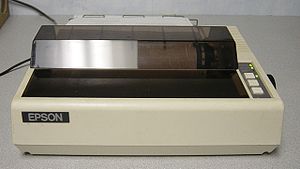
English: An Epson MX-80 dot matrix printer

An Epson MX-80 dot matrix printer (Photo credit: Wikipedia)

Two to three years seems to be the average replacement rate. DOT Matrix printers were and still are built to last a long time. The ink ribbons, printing heads, belts, and motors withstand a great deal of use for an extremely long time. Nearly every Dot matrix printer was made to print high levels of output, even those intended for home use.

A dot matrix printer is great for printing out things that are non-professional. I wouldn’t print my résumé on a DOT Matrix printer, but I do print out emails, Craigslist posts, contact information, maps, and things I want to read later.

How much does a dot matrix printer cost?
New dot matrix printers are expensive, and I would not recommend buying them unless you own a business and truly need something to have a higher speed output. The average computer user may find interest in a new dot matrix printer. These can be found on eBay, but they often pop up at surplus sales and garage sales.
The actual costs vary greatly. Don’t buy something expensive.

What should I look for in a dot matrix printer?
By today’s standards, it will be good to search for a printer with a 24-pin count or more. 9-pin output is really met exclusively for word processing and will not print out things such as PDF documents or basic graphics very well. 9-pin printers look best when printing in their native fonts, but modern word processors rarely support text printing anymore and the 9-pin printer is becoming obsolete.

Star LC-10 dot matrix printer, this printer wa...

Star LC-10 dot matrix printer, this printer was actual technology in the 1980s (Photo credit: Wikipedia)

One major point of consideration is to make sure that the printer you are considering buying has ribbons available. Typically, a ribbon will print about 1 million characters before it begins to ware and become difficult to read. You can spray WD-40 into the ribbon container to extend the life, but this will only last for so long. Ribbons are typically available as new-old-stock, these will work just fine. There are a few companies still making ribbons.There are color dot matrix printers as well. They aren’t useful for printing family photos, but they work fine for printing graphs. I often print Craigslist ads out which contain photos, a 24-pin color dot matrix printer renders the images just fine for reference, but not for high detail identification.

After you’ve adjusted to using your new printer and you go to order ribbons, consider buying a few.

The paper for a dot matrix printer usually comes in reams. These have perforated edges with holes that allow a dot-matrix to tractor feed the paper in. There are auto-sheet-feeder printers available as well that take standard A4 (8.5 X 11″) paper like you would use in any ink-jet printer. You should take this into consideration.
I truly like paper reams, I rarely have to visit the printer to add more paper (ink-jet printers store a small amount in their paper tray, a ream of paper might be 1,500 pages all connected and you don’t have to visit the printer until it runs out or jams). I also enjoy that I don’t have to staple papers to keep them together.

Cons of dot matrix:
Dot matrix technology is slow. Especially color printing, which can take a very long time. I tend to hit print, and grab the paper later. I don’t use my dot matrix printer when I need something really quick.

The ribbons for many printers can be difficult to find.

Reams of paper are harder to find at stores. Depending on where you are, you may have to special order paper or buy online.

Some dot matrix printers jam up often, others do not. My Citizen GSX 140 is a great printer, but the cover that comes over the paper exit often does not properly allow paper to get through and sometimes it gets scrunched up and I have to remove the paper myself.

A review of the pros:

The cost. You will never beat the cost of a DOT Matrix printer. The total cost of a DOT Matrix printer, paper, and a new ribbon will likely cost less than buying a single 3-color inkjet cartridge.

The longevity. You will probably go years before you replace it, which is especially good considering it probably printed for years before you bought it.

The efficiency. Ink-jet ink does not last long and is very expensive.

 

Enhanced by Zemanta
Posted in Computer Stuff, Hardware and All That | Tagged , , , , | 1 Comment

Can you refill a dot matrix printer ribbon with WD40?

“Can you refill a dot matrix printer ribbon with WD40?”
Yes, you can!

This even works on color ribbons.

Just open the cartridge up carefully, being sure not to break any plastic parts.

English: Inmac ink ribbon cartridge with black...

Typical ribbon cartridge.        Inmac ink ribbon cartridge with black ink (upper) Inked and folded lengthy ribbon squeeze in the cartridge, zoom in of inside part, pull ribbon in mechanism and ribbon (lower) See File:Printer dot matrix EPSON VP-500.jpg File:Printer dot matrix EPSON VP-500.jpg (Photo credit: Wikipedia)


Spray WD40 liberally inside the cartridge.

Close the cartridge.

Advance the ribbon forward multiple rotations so that the ribbon that was outside gets exposed to the WD40. Let the ribbon stand for an hour or so to fully absorb the WD40.

And print!

Can you use silicone spray? No. Why not?
Mixing different kinds of lubricants often leads to a mess that isn’t so lubricative (sp). Ink ribbons usually contain oil in them. This lubricates the print head and pins and is also the result of the ink being left in the paper. Mixing silicone spray may cause gunk to build and could potentially ruin the print head, result in bad printing, and will just be bad in general for the printer. WD40 seems to be close enough to the original oil used in most ribbons that it does not cause this kind of harm and will continue to lubricate the print head just fine.

Related: Read another article about DOT Matrix printers and why they are still useful on Zylblog

Enhanced by Zemanta
Posted in Computer Stuff, Hardware and All That | Tagged , , , , , , , , , | 3 Comments

July Site Updates

I have not published a site updated for a while now, however some changes have happened that I thought were notable.

Uptime has been great 99.78% uptime over the last 30 days (that was 10 instances of the site going down for more than 5 minutes), 99.02% over the last 6 months (85 drops of connectivity). This is great uptime considering that we only have one server, and we have no UPS battery backup or backup networking hardware. Also, during the last two months, the router that the server is connected to has been failing resulting in most of the downtime. Zylblog is on a new router now and we are back to getting our “normal” super-fast connection (we are on fiber).
Our internet connection peaks at 54Mbps down, 47.94Mbps up, and usually doesn’t drop below 20/20Mbps up and down. The connection slows as it gets later in the afternoon into the evening. The new router significantly improved this as well.

As of June 27th, our visitors have gone up compared to previous months of this year. We typically get a small amount of returning visitors, but our returning visitors has increased to about 13.19% of our traffic. The page-per-visit ratio is 1.16. As new unique visitors have gone up, so has the average time spent on the site. For the last year of our .com domain, the percentage of new visitors has remained fairly stead, it is finally dropping in place of those revisiting.

Stats for the site:
Our top page continues to represent non-technology. Accordion Fingering Chart has been our number one page ever since it was published on October 7th, 2009, back before Zylblog ran on a typical domain (zylstrablog.co.nr, which still works).
Our top refer is one of our sister-sites, Winfix, which is a search-driven site. The IP address 66.172.101.250 is also us, as well as Zylblog.com.
Winfix appears because many articles link back to this site. Also, internal links clicked leading to other pages on Zylblog would result in Zylblog.com being a refer. Zylblog.co.nr is the main reason 66.171.101.250 would appear, followed by the fact that many links on the web linking to us still use the IP address by itself.

Top Pages

  1. Accordion Fingering Chart (bass) | ZylBlog
  2. The Sims 3 Online Play | ZylBlog
  3. Run The Sims 3 under Linux | ZylBlog
  4. » Difference between CLVL and CUM GPA
  5. » Play the Sims 3 Online for Free (BETA/Trial)
Top Referrers

  1. winfix.zylblog.com
  2. 66.172.101.250
  3. zylblog.com
  4. 36ohk6dgmcd1n-c.c.yom.mail.yahoo.net
  5. facebook.com
Top Searches

  1. (not provided) (Unknown?)
  2. accordion bass chart
  3. connect economics answers
  4. the sims 3 online play
  5. clvl gpa
Posted in Computer Stuff, Website Updates | Tagged , | Comments Off on July Site Updates

Computer Components: What really lasts?

I have repaired computers for normal everyday computer users for a very long time. I have also spent a lot of time repairing computers for a local school district. I’ve seen all major brands, and have used and repaired computers with perhiples from floppy discs and the ever-loved ZIP Drives to high-tech RAID systems.

Component failure often makes me disappointed in manufacturers of computer parts. I have found so few brands that have products that truly withstand the test of time and normal use. Every component for a computer is bound to fail at some point, and there will always be flukes that should not totally represent a given manufacturer, but why is it that in modern computing so many things fail so quickly?

Questions for comments: What components do you have that have withstood the tests of time?

Here are a few examples of my notable computers and components:
I have a IBM model PS/2 (read more, Wikipedia) (the first computer to use a PS/2 port), a significant computer in computing history. The only thing that has failed on it is the original 80MB hard drive. At that point in time, computers did come with a keyboard and monitor. The computer was built in 1987. It still powers on, it will still boot off a floppy disk, the keyboard works fantastic (in fact, it is the highest quality keyboard I have ever used), even the mouse tracks just fine. The computer has SIMM RAM, a 1MBPS network adapter, power supply, IDE controller and early component controller board, floppy drive, and a motherboard. None of these components have failed.

I also have a 24-pin Citizen GSX 140 color DOT Matrix printer, built in about 1989. I still use it often for printing text and anything that will work fine being low resolution. Sure it is slow, but the cost to maintain and run is nothing compared to an ink-jet printer. For as many intricate parts as it has, it is amazing that it continues to work. Ribbons for these printers are still cheap, and rather than buying a new ribbon once it starts to fade I just spray some WD40 into the ribbon container and I keep printing.

Also in my collection of computer equipment is a 1985 9-pin IBM ProPrinter, a low-resolution draft printer. By no means is this fast, I do not use it very often since I have my much better GSX 140 printer, but what amazes me about this printer is how cheap it was to buy in 1985. The built-in fonts are able to render very readable text, but the printer will print any font generated by a computer just fine as well (and will print just like any other dot matrix printer for non-text printing). Ribbons are still available, people still use these printers. Dot matrix printers are the number-one printer still in invoice printing and have many other applications.

One of the oldest and most significant in my collection of computers is a 1983 Apple iie computer. This is still, somehow, working. Stored poorly for years waiting to be inventoried, I found it and was able to take it. It features an external floppy drive (which isn’t functioning 100%, but still works), power supply, RAM, a built-in keyboard, and a video adapter. It runs just fine.


So, the question for users: What computers and computer components have you owned (both newer and old) have you had that have truly withstood the tests of time and quality?

Enhanced by Zemanta
Posted in Computer Stuff, Hardware and All That | Tagged , , , , , , , , , , , , | 1 Comment

The Kindle E-Reader (The $79 Wonder)

I ended up with an Amazon Kindle, the $79 “just plain Kindle” with no special features. Prior to having a Kindle, I always thought that they were strange devices. I had a hard time understanding the concept of abandoning a book made of paper, and I could never imagine myself being the kind of person who would enjoy reading something off of a screen.

My preconceived notion about the Kindle was mainly about the screen itself, which is unlike any other you could have ever used — no LCD technology here, E-Ink is completely different and operates very differently from a LCD screen. The packaging of the Kindle is fairly lightweight, I am glad they have chosen to put as little in the box as possible. It comes with a quick setup card, USB Cable, and that is it. The manual is already on the device. One unfortunate part of the device that I did not expect was the “Special Offers” “feature”

English: Latest Kindle (2011) showing Esperant...

English: Latest Kindle (2011) showing Esperanto characters. Esperanto: Lasta Kindle montranta Esperanto-literojn (Photo credit: Wikipedia)

that is included.

These devices are very cheap, in fact, the one I have was actually purchased for $69. Amazon subsidizes part of the cost through advertising. Some of you, like me, would now be re-reading that line knowing that a caveat is approaching. There is only one thing about the Kindle that I do not like: it displays ads. The Kindle screen uses so little electricity that it does not waste power to leave an image on the screen. After your device is activated, it will regularly check for new advertisements. Since the screen never actually shuts off, it goes to a “screensaver” which is really just a full-page advertisement and just sits there. The bottom of the homepage of the Kindle (where you access your books) also has an advertisement. These do not impede with the device performance, but I found Amazon’s way of notifying customers that the devices they have purchased has this to be quite poor. I examined the small box and contents multiple times for something that made it clear that there were such advertisements present on the device, but the only thing noted on the box is that it has the added feature of “Special Offers”, which apparently is Amazon’s way of saying: “It has ads.” The both good and bad news is that you could pay $30 to have the ads disabled. You can also later log into your Amazon account and say “show me less/more ads related to…” if you want them to be more relevant. Thus far, I have not seen inappropriate ads, but I feel it doesn’t say anything about masculinity when you have a full-page ad for a diamond necklace pendant…

The Amazon Kindle has not backlight. Backlight technology is specific to LCD and related technologies that need light behind whatever is changing the color. The Amazon Kindle’s screen actually uses light just like a book, where instead of providing its own light, it reflects light back. This is the key to the Kindle being easy to read. The viewing angle is extremely wide, just like printed paper, and you can read outside on a sunny day with no problem at all. I think that the screens look fantastic. I took a small low-power microscope to the screen, pixelization is very hard to see on this device. I cannot get my head around the fact that it is so easy to use. The technology referred to by Amazon is “E-Ink”, which is actually used in a few other devices. The disadvantage of E-Ink is that there is no reasonable way to see the screen in the dark — these kinds of devices will not work with a backlight. Continue reading

Posted in Computer Stuff, Hardware and All That | Tagged , , , , , , , , , | Comments Off on The Kindle E-Reader (The $79 Wonder)

Google Memorial Day Doodle

A reader recently asked me about my previous Google Doodle post that I made after Memorial Day of last year, this is an excerpt of what I wrote back:

“Myself, I have a lot of respect for people who have fought for our country, especially when so many of our wars are remotely fought and the people making the decisions never see combat. I think it would be shameful for Google to make a big doodle (pun not intended) about it on their page, and though the ribbon is simple I think it symbolizes more importance.

Google’s doodle is a gimmick, it gets people to use their site. When you see a doodle, you naturally click on it to get search results that tell you all about it. This, of course, results in a search page with ads on the side. Essentially, Google does make revenue off doodles.

I don’t think Google ever met to make a political stand by not originally placing a doodle on memorial day last year, but I do think they were trying to be respectful. ”


Enhanced by Zemanta
Posted in Computer Stuff, Web Services, Application, and Design | Tagged , , , , | Comments Off on Google Memorial Day Doodle

Free Ebooks (in many formats, including PDF and Mobi) for E-Readers

These are a few of the more interesting sites I have found for free ebooks for the Kindle and other devices. Many of them only have PDF files. The OpenLibrary also features books  that can be “checked out” like a library which will deactivate after a given amount of time.

Free Ebooks:
ManyBooks: http://manybooks.net/titles.php
Project Gutenburg: http://www.gutenberg.org/ebooks/
OpenLibrary.org http://openlibrary.org/
Archive.org Texts: http://archive.org/details/texts

Amazon also has a collection of free books, largely classics: www.amazon.com/b?ie=UTF8&node=2245146011

Or, you can search any subject of Kindle Books on Amazon and simply sort by prices lowest to high to see free books in a wide variety of subjects.

Enhanced by Zemanta
Posted in Computer Stuff | Tagged , , , , , , , , , | 1 Comment

The Best Songs about Las Vegas

By guest author Samantha Black:

The best songs about Las Vegas
Because Las Vegas is such an iconic city, it makes sense that there would be a large number of songs written about it. The bright lights, 24/7 party atmosphere, luxurious hotels, and world-class gaming available in Vegas makes it a city unlike any other in the world. Whether you are packing for a trip to the city, or even just planning on improving your poker playing skills at playpokerfree.com prior to trying your luck at the Vegas tables sometime in the future, have a listen to a few of the best songs about Las Vegas – they will certainly help to get you in the mood.


Viva Las Vegas


Written in 1964 by Mort Shuman and Doc Pomus, “Viva Las Vegas” might very well be the most famous song with Las Vegas at its heart. Elvis Presley recorded it for his film of the same name, which was one of the most popular films he ever made. The song has been covered by a wide variety of artists over the years.


Don’t Make Me Come to Vegas


“Don’t Make Me Come to Vegas” is a song off Tori Amos’ 2002 concept album, Scarlet’s Walk. The song is written from the point of view of Amos’ Scarlet character, and involves her getting a phone call from her beloved niece, who is having trouble with her man; Scarlet threatens to come to Vegas and yank her right from his bed.


Luck Be a Lady


We’ve all heard of Lady Luck and nowhere is she better personified than in Frank Sinatra’s “Luck Be a Lady.” Interestingly, though he made it famous, Sinatra didn’t originally perform the song, which was written in 1950 by Frank Loesser. It was originally performed by Robert Alda, and was featured in the musical Guys and Dolls. The song reminds us that in Las Vegas, anything can happen and that luck really needs to be a lady!


Leaving Las Vegas


“Leaving Las Vegas” is the song that made Sheryl Crow famous, and was Crow’s first hit single in the United States. Crow wrote the song along with David Baerwald, Bill Bottrell, David Ricketts, Kevin Gilbert, and Brian McLeod and it appeared on her debut album, Tuesday Night Music Club back in 1994. The video features Elvis impersonators and plenty of showgirls, and reminds us that while glamorous, there is a rough side to Sin City as well.


Vegas


There are two groups of people in this world: those that love the sound of Nico’s voice and those that hate it. Although there are a lot of people that probably haven’t heard the late singer’s “Vegas” (released in 1981), it is an essential Las Vegas song. A little dark and a little sad, Nico gives herself over to this song completely as only she could, and reminds us all that life is just one big gamble.


While the five songs listed above are essential Las Vegas songs, it must be stated that there are actually hundreds of songs out there that mention the city. Artists including Tom Waits, The B-52s, Robbie Williams, the Cocteau Twins, Dean Martin, and many others have written or performed songs about Las Vegas. In the end, it is really a matter of personal taste when it comes to deciding what the best songs about Las Vegas actually are.


Posted in Music, Uncategorized | Tagged , , , | Comments Off on The Best Songs about Las Vegas

Spambot Updates: Next steps, account activation testing

We are taking the next step in our spambot experimentation, it begins today. We are once again completely resetting the test forums. The main change for this next round is to see how many bots can get past email activation.
To be clear (again), email activation is when the forum system sends the newly registered member a link to click in an email. Unless the link is clicked, the account will not become active.

CAPTCHA image will be set at a minimum difficulty.

Enhanced by Zemanta
Posted in Spam Research | Tagged , , , | Comments Off on Spambot Updates: Next steps, account activation testing