I bought an Acer Aspire 5 A515 about a year ago. It’s possibly a little late for a review, but for anyone looking into this series…
$699.99 USD
Quick points
Pros: affordable, lightweight, backlit keyboard, SSD, dedicated graphics for basic gaming, numpad
Cons: terrible speakers, no dedicated function keys, squished numpad, no dedicated mouse buttons, squished arrow keys, limited RAM expansion
Specs: i7 8th Generation CPU (i7-8565U 1.8Ghz), nVidia GeForce MX250 (2GB), 512GB SSD, 8GB RAM
Story: Last summer (2019) I needed a new laptop for my last semester of school. My Lenovo was quite the workhorse and kept up well during its 7 years of continuous use, and given the money I spent on it I expected it to. I had just moved, the budget for anything over $800 wasn’t available. I’ve always preferred laptops to desktops. I like mobility, although I rarely actually remove my laptop from my small apartment. But, I use it as my media center — it’s a TV, it’s a music player, it’s how I browse social media, it’s where I do my research, and it’s where I play the occasional game or two (I am not a gamer). It’s nice to be able to have it at a desk, and easily move to the couch.
In August, I’ll have had this machine for a year. It’s working as I expected it to.
Performance
Now, I’m not the computer user I used to be. But, I have to admit, this thing blows me away. I’ve never had an SSD. I used to be so reluctant to shut my computer off — waiting for boot up, background programs to load, etc. But this thing is BLAZING FAST (in my world at least, certainly not compared to other hardware). Windows 10’s kernel hibernation works well alongside the specs to offer a quick boot up. All my daily programs are quick to launch.
In terms of games, I’m no gamer. This laptop isn’t meant for gaming. But, I dabble. This laptop runs Sims 3 with maximum graphics settings with no problems (and certainly runs Sims 4 just fine, too, although the loading screens are longer than appreciated.) I occasionally run GTA 4, which cannot run with the graphics as high as nVidia’s GeForce Experience suggests — but no one said this was a gaming machine. It runs solitaire at lightning speed *shrug* which best describes my regular gaming.
General Overview
Going back to the pros and cons. One of the RAM modules is soldered in, severely limiting upgrade capacity. 8GB is enough for my daily operations, but I’ll be looking at upgrading as the years pass and software does what it does best — becomes more bloated. (How a web browser easily uses over a gig of memory is beyond me.) 500GB available on the SSD is also enough for me — I personally only have 89GB free, but I have a lot of redundant backups stored on this computer that I could easily rotate to an external drive. Not to mention several virtual machines and about a billion ISOs. But, if you store high def content on a drive like some sort of digital hoarder, you’ll run out your capacity quickly. Oddly, I’ve never had a desktop or laptop with more than 500gb of storage.
If I had to offer a reason to not buy this machine, it comes down to these issues:
Sound. God, the speakers on this device are awful. I rarely don’t have my Bluetooth Speakers connected to this machine because I cannot stand the friggin’ noise that comes out of these awful, awful speakers. The speakers are on the underside at the front, so if you actually have the laptop in your lap, the sound gets muffled. The volume limitations are noticeable, too — some content simply just isn’t loud enough to clearly understand on these speakers. This is a huge no-go for me, and had I known how bad it would be I would have likely looked around a little longer. The mic in and headphone out are shared as well. The built in microphone is shit, but no surprise there. The webcam works better than I anticipated.
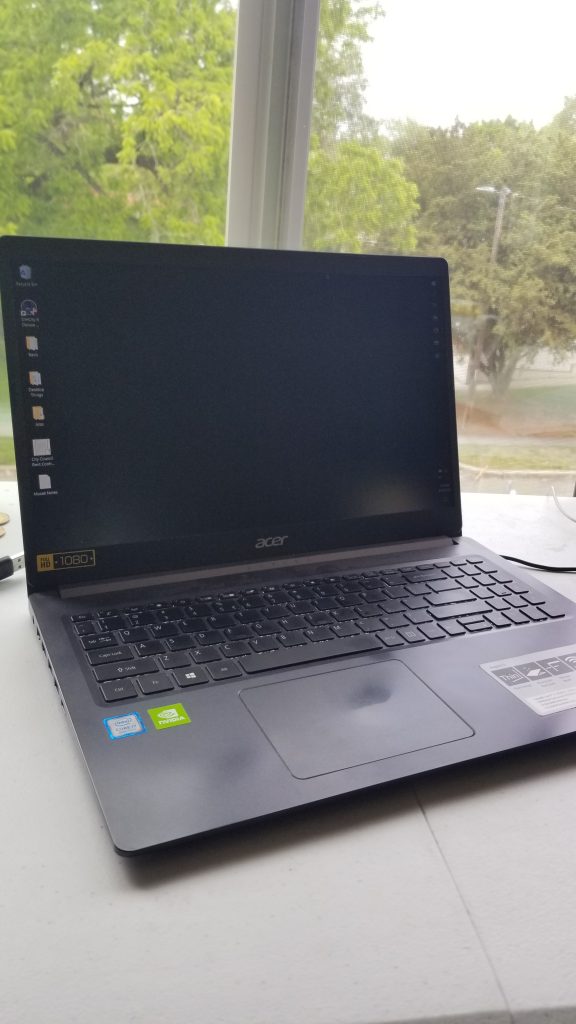
Second, the function keys are not dedicated, and the function keys themselves are secondary. As an old fashion power user, I’m used to using function keys on a regular basis. But, pressing F1 puts my laptop to sleep… F2 turns off my wifi… F4, which I’ve used to close programs FOREVER, changes my screen brightness. You MUST hold down the function (Fn) key to use the function keys. There is no way to change this. The volume up and down keys are also on the function keys (F9, mute, and F10/11 up and down). A year in, and I still try to ALT-F4 my way out of programs. Where this really messes me up is in The Sims where F1, 2, 3, and 4 alter play modes. I keep turning off my WiFi each time I go into Buy Mode. Laugh if you will, I consider this a serious limitation.
The chicklet/island keyboard is fine, although I do not type on it as fast as I did my old Lenovo which had a slightly longer travel distance. If I’m going to get serious about typing, I plug in my old IBM Model M keyboard. The same can be said for most laptops these days. This is also the first computer I’ve ever used that didn’t have dedicated mouse buttons. This doesn’t impact productivity so much as it makes gaming a little difficult. Mouse buttons seem to have gone the way of the dodo on trackpads. One year of regular use has worn the mat finish from the trackpad. The keys have become a little smoother too, but are holding up just fine (and no fading of the letters).
I might also add that the screen brightness is adequate, but I wish it gave out a little more. I work in front of a window and I definitely have to pull the curtains when it’s bright out.
Battery life. Ah, it’s never what is advertised. On maximum battery saving mode, I’ve gotten about 5 hours — far short of the advertised 11. That’s running nothing but my browser and LibreOffice (while streaming Pandora). I suppose, if it were idling with no applications open, it’d go longer. Is that what they mean when they say 11 hours? Who knows.
Would I buy it again?
I might look for another machine with better speakers and with dedicated function keys. Heck, I’ve always limited myself to ~15″ screen, but I think given my purposes a larger screen that has more keyboard space (for a better arrow and number pad configuration) would make more sense. But, in terms of bang for your buck, this machine is absolutely not a bad deal.
Well, there you have it, my review of this machine. Not proofread, no time for that. Comment angerly below. What can I say, I’m lazy?

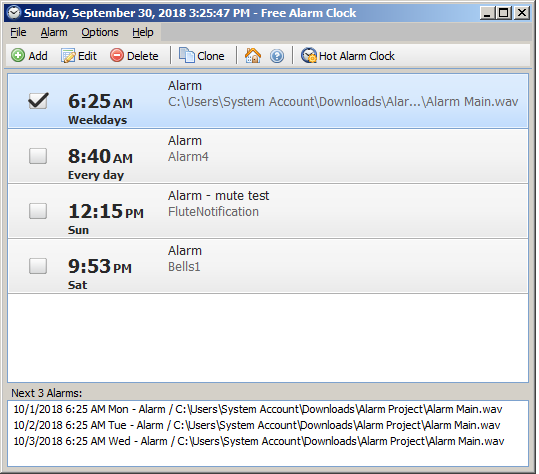 program written for Windows with a variety of useful features. It has proven to me to be reliable as my daily wakeup alarm for the last 6 months or so.